
How do you check a Google Ads audit? A 10-minute method
Get the export the audit was written from, then check the numbers the audit worked out, not just the ones it copied: the totals first, then every group of search terms, then shares and ratios. Set aside targets and forecasts, which no export can confirm. Here is the method step by step, with the slips to look for at each step.
- Get the exportSame report, same dates1 min
- Sort the numbersCopied, worked out, or outside the data1 min
- Re-add the totalsCost, clicks, conversions2 min
- Check group sumsEvery "these terms" figure2 min
- Ask "a share of what?"The right total under every %1 min
- Check the labelsClicks aren't conversions1 min
- Check direction words"Fell" has to mean lower1 min
- Ask for the workingTargets, forecasts, benchmarks1 min
1. Get the same export the audit used
A number can only be checked against the data it came from. Ask for the report and the date range, or download them yourself: in Google Ads, open Campaigns, then Insights and reports, then Search terms, pick the same dates, and choose Download, then .csv. A report for a different week will disagree with a correct audit.
2. Sort the numbers into three kinds
3. Re-add the totals first
Add up cost, clicks and conversions yourself. If the export ends in Google's Total rows, use those, but don't count them twice. If it has no Total row, an audit had to add the rows itself, which is exactly where we saw a total go wrong and take the cost per conversion and every share with it.
4. Check every "these terms" sum
When an audit says "these nine terms wasted ₹24,427", count the terms it lists and add them up. In one AI audit we tested, the list had only eight. They did add up to ₹24,427, but the ninth search term with no conversions, worth ₹860, was missing from both the list and the total. Check that each term is counted once, too. Google lists a search term once per campaign, ad group and match type, so the same term can sit on several rows.
5. Ask "a share of what?"
"15% of spend" is only right against the right total. Check whether the audit divided by total cost, by search cost only, or by the waste it found. A share computed against the wrong total looks perfectly reasonable on the page.
6. Check the label on each number
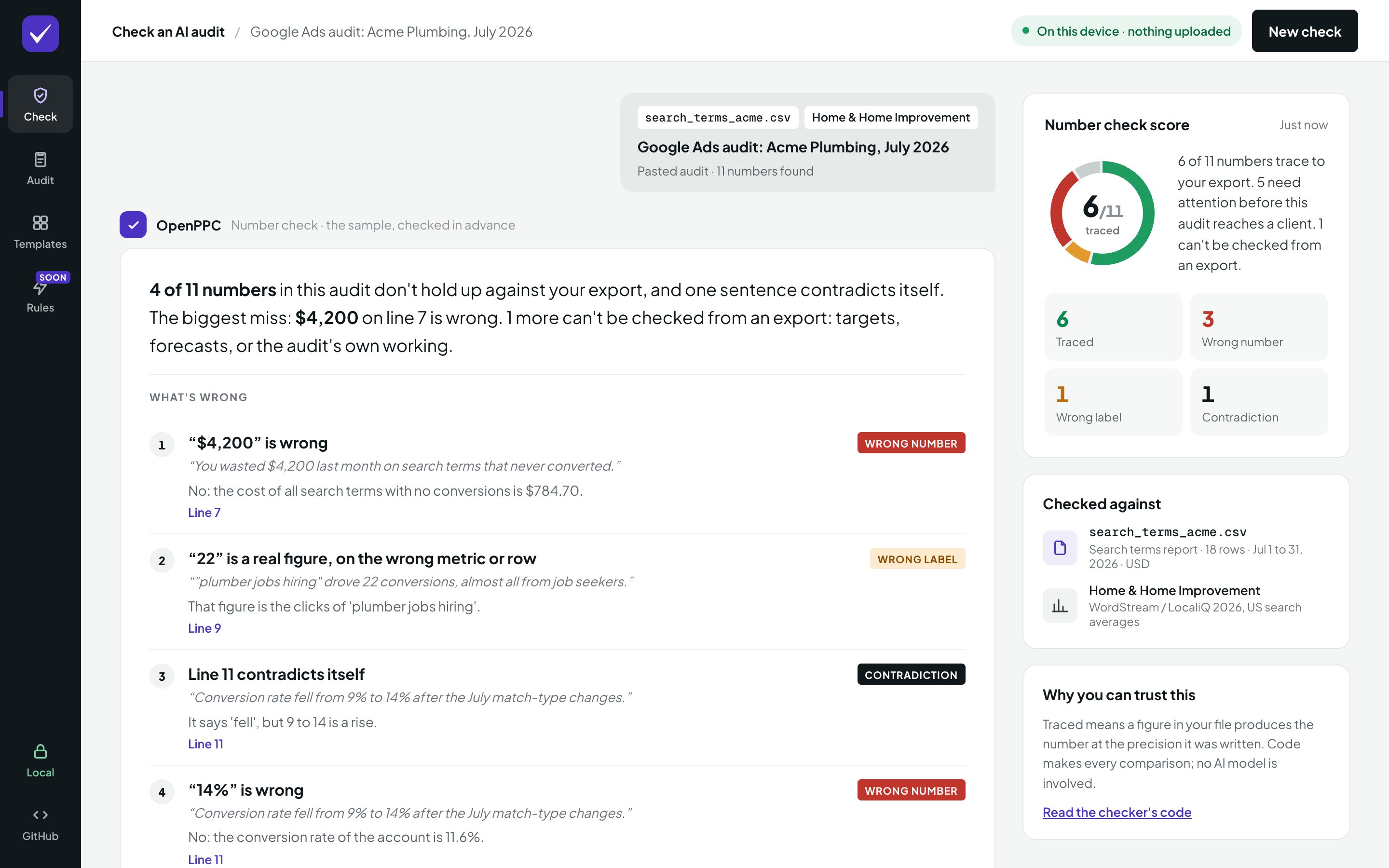
A right number can carry the wrong label. "22 conversions" when 22 is that term's clicks is a real figure, on the wrong metric. Look for clicks reported as conversions, cost reported as cost per conversion, and one search term's figures credited to another.
7. Check the direction words
"Conversion rate fell from 9% to 14%" contradicts itself. Every "rose", "fell", "up" and "down" should agree with the numbers next to it.
8. Ask for the working on everything else
For targets, forecasts and benchmarks, ask where each one comes from. A saving forecast should show the spend it assumes and how it was worked out. An industry average should name its source.
"plumber jobs hiring brought in 22 conversions."
Wrong label. 22 is the term's clicks. It had no conversions at all.
"Conversion rate fell from 9% to 14%."
Wrong direction. 14% is higher than 9%, so the rate rose. The word and the numbers disagree.
"These nine terms burned ₹24,427."
Wrong group sum. The audit listed eight terms, and they add up to ₹24,427. The ninth term with no conversions, worth ₹860, was missing from both the list and the total.
Or let code do it
Done by hand, this takes about ten minutes for a short audit and much longer for a long one. OpenPPC does it in seconds: paste the audit, add the export, and every number comes back traced, a wrong number (with the real figure), a wrong label, or can't check when no export can confirm it. Sentences that contradict their own numbers are flagged, and Copy fix list gives you a note to send back to whoever wrote the audit.
Questions
What do I need to check a Google Ads audit?
The audit, and the Google Ads export it was written from: usually the search terms report or the keywords report for the same date range, downloaded as a CSV.
Can I check an audit that came as a PDF?
Yes. Copy the text out of the PDF and paste it next to the export. The numbers are checked the same way whatever wrote the audit.
Is this only for AI-written audits?
No. The same steps work for an agency's audit, a freelancer's report or your own. The checker doesn't care who wrote the numbers, only whether the export backs them up.
What if a number can't be checked?
Treat it as a claim, not a fact, and ask for the working. Targets, forecasts and industry benchmarks can be perfectly reasonable, but no export can confirm them.